
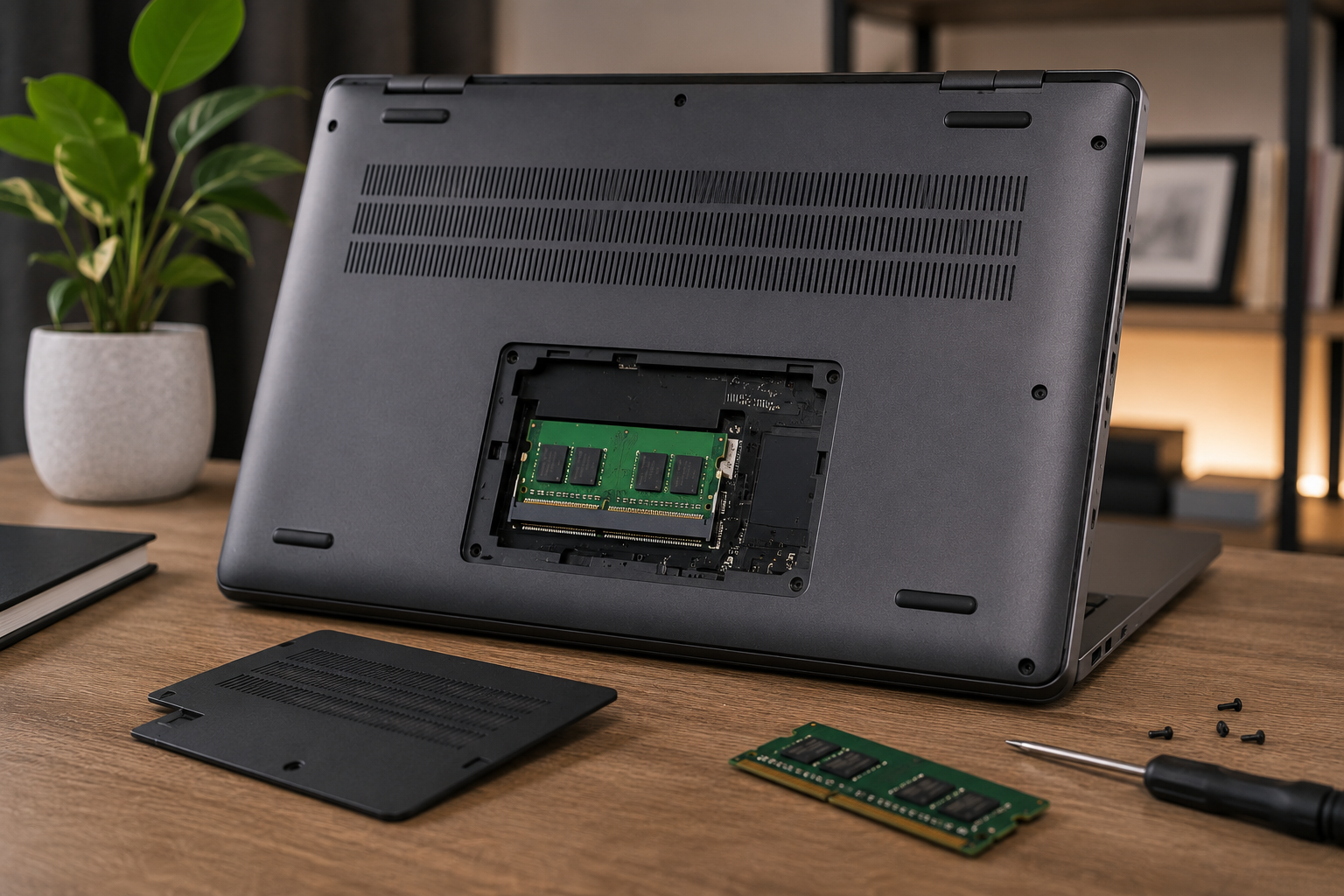
Can you upgrade RAM in a laptop? Learn which laptops support RAM upgrades, which don't, and everything about DDR4, DDR5, SO-DIMM, Dual Channel, and onboard memory in this complete 2026 guide.
Can You Upgrade RAM in a Laptop? What You Must Check Before Buying (2026)
One of the first questions people ask before buying a new laptop is: "Can I upgrade the RAM later?" It's actually much more important than many people realize. When choosing a laptop, focusing only on the processor or graphics card isn't enough. The ability to upgrade the memory can determine how well your laptop performs several years from now.
Many buyers assume every laptop allows RAM upgrades. Unfortunately, that's not true. Some laptops come with removable memory modules that can easily be upgraded, while others have RAM permanently soldered to the motherboard, making upgrades impossible. Buying a laptop without understanding this difference may lead to unnecessary expenses and disappointment in the future.
If you're currently shopping for a new laptop, we also recommend reading our Best Laptops of 2026 guide, where we've selected the best laptops for different budgets and use cases.
In this guide, we'll explain what RAM is, how laptop memory upgrades work, which laptops support upgrades, the differences between DDR4 and DDR5 memory, what a SO-DIMM slot is, and which hardware specifications you should always check before making a purchase.
What Is RAM and Why Is It Important?
RAM (Random Access Memory) is your laptop's temporary working memory.
Every application you open, every browser tab, your operating system, games, and background processes all use RAM while running. Since the processor constantly accesses information stored in RAM, both its capacity and speed have a major impact on your laptop's overall performance.
For example, opening 20 Google Chrome tabs while working in Microsoft Excel, editing photos in Photoshop, and joining a Microsoft Teams or Zoom meeting simultaneously requires a significant amount of memory. If your laptop runs out of RAM, Windows starts using your SSD as virtual memory, which is considerably slower and can noticeably reduce system performance.
That's why RAM capacity is one of the most important specifications to consider when buying a laptop.
How Much RAM Do You Need in 2026?
As software becomes more demanding every year, RAM requirements continue to increase. While 8 GB used to be sufficient for most users, choosing the right amount of memory today depends on how you plan to use your laptop.
8 GB RAM
8 GB of RAM is suitable for users who mainly use their laptop for:
Everyday web browsing
Microsoft Office applications
Online learning
YouTube streaming
Email and social media
If your laptop is mainly for everyday tasks, 8 GB RAM Laptops may be sufficient.
16 GB RAM
Today, 16 GB is considered the sweet spot for most users.
It's ideal for:
Programming
Adobe Photoshop
AutoCAD
Heavy web browsing
Modern gaming
Multitasking
If you want your laptop to remain fast for years, 16 GB RAM Laptops are the recommended choice.
32 GB RAM
32 GB is designed for professional workloads.
It's ideal for:
Adobe Premiere Pro
After Effects
Blender
DaVinci Resolve
Virtual machines
AI applications
3D modeling
For these demanding workloads, consider 32 GB RAM Laptops.
64 GB RAM
64 GB of RAM is intended for users who require maximum performance.
Examples include:
Large AI projects
Engineering software
Professional rendering
Multiple virtual servers
If your work involves these tasks, 64 GB RAM Laptops will better meet your needs.
Can Every Laptop Be Upgraded?
The short answer is No.
Not all laptops use the same memory design. Depending on the manufacturer and model, RAM may be fully upgradeable, partially upgradeable, or permanently soldered.
That's why checking the laptop's memory configuration before buying is extremely important.
Generally, laptops fall into three categories.
1. Fully Upgradeable RAM
These laptops use standard SO-DIMM memory slots.
Users can:
Install additional RAM
Replace existing memory modules with larger ones
Enable Dual Channel memory configuration
These laptops are usually the best option for long-term ownership.
Popular examples include:
Lenovo LOQ
Lenovo Legion
ASUS TUF Gaming
HP Victus
Dell G Series
Acer Nitro V
If you're planning future upgrades, most models in our Gaming Laptops category offer upgradeable memory.
2. Hybrid Memory Design
Many modern laptops use a hybrid memory configuration.
For example:
8 GB soldered RAM + one empty slot
16 GB soldered RAM + one empty slot
Part of the memory is permanently attached to the motherboard, while the remaining slot allows future upgrades.
This design combines a slim chassis with limited upgradeability.
3. Fully Soldered (Onboard) RAM
Ultrabooks usually take a different approach.
In these laptops, all memory is soldered directly onto the motherboard.
This means:
RAM cannot be replaced
No additional memory slots are available
Future RAM upgrades are impossible
Common examples include:
ASUS Zenbook
Lenovo Yoga Slim
HP Spectre
Dell XPS
Apple MacBook
If you're planning to buy a thin-and-light laptop, display technology is another important factor to consider. Learn more in our IPS vs OLED comparison guide.
What Is a SO-DIMM Slot?
Laptop memory modules are smaller than desktop DIMM modules and are known as SO-DIMM (Small Outline Dual Inline Memory Module).
Before buying a laptop, always check the following:
How many RAM slots are available?
How many slots are free?
What's the maximum supported RAM capacity?
Does it use DDR4 or DDR5 memory?
Does it support Dual Channel memory?
Checking these specifications before purchasing will help ensure your laptop can be upgraded more easily in the future.
DDR4 vs DDR5 RAM: What's the Difference?
One of the most important specifications to consider when buying a laptop is the type of memory it uses. Today, the two most common standards are DDR4 and DDR5.
At first glance, the only difference may seem to be the name. However, these two memory technologies differ significantly in terms of speed, power efficiency, bandwidth, and long-term performance.
DDR4 RAM
DDR4 has been the industry standard for laptops for many years and is still widely used in a large number of models today. It offers reliable performance for everyday computing, office work, web browsing, and most general-purpose applications.
If you're looking for an affordable laptop, you'll find plenty of options in our DDR4 Laptops category.
DDR5 RAM
DDR5 is the latest generation of laptop memory. Compared to DDR4, it delivers higher bandwidth, lower power consumption, and better overall performance.
The main advantages of DDR5 include:
Faster data transfer speeds
Lower power consumption
Better support for future software and workloads
Improved compatibility with Intel Core Ultra and AMD Ryzen AI processors
If you plan to keep your laptop for several years, DDR5 Laptops are generally a smarter long-term investment.
DDR4 or DDR5 – Which One Should You Choose?
The answer depends entirely on how you intend to use your laptop.
If you primarily use your laptop for:
Everyday computing
Office applications
Internet browsing
Online classes
DDR4 will still provide excellent performance.
However, if you work with:
Programming
Adobe Creative Cloud applications
Blender
AutoCAD
AI tools
Modern AAA games
DDR5 is the better option both today and for the years ahead.
What Is Dual Channel RAM?
Another specification you'll often see in laptop descriptions is Dual Channel Memory.
With Dual Channel technology, two RAM modules operate simultaneously, allowing the processor to access memory more efficiently.
For example:
1 × 16 GB RAM
2 × 8 GB RAM
Although both configurations provide 16 GB of total memory, the second setup usually delivers noticeably better performance.
The benefits are especially visible in:
Gaming
Graphic design software
Video editing
Heavy multitasking
Using two memory modules allows the system to transfer data more efficiently, resulting in smoother overall performance.
Does Upgrading RAM Make a Laptop Faster?
This is one of the most frequently asked questions.
The answer is:
Yes—but not always.
If your laptop is running out of memory during everyday use, upgrading the RAM can significantly improve performance.
For example:
Windows boots faster.
Web browsers handle dozens of tabs more smoothly.
Photoshop becomes more responsive.
AutoCAD and other professional applications perform better.
Multitasking feels significantly smoother.
However, upgrading RAM cannot make an older processor or a weak graphics card more powerful. RAM only removes memory bottlenecks—it doesn't increase CPU or GPU performance.
Does More RAM Increase FPS in Games?
This is another question gamers ask frequently.
If your laptop currently has only 8 GB of RAM and memory usage reaches its limit while gaming, upgrading to 16 GB or 32 GB can improve frame stability and reduce stuttering.
The difference is especially noticeable in games such as:
Counter-Strike 2
Valorant
GTA V
Call of Duty: Warzone
Fortnite
Keep in mind that your graphics card and processor have the biggest impact on gaming performance.
For more gaming laptop recommendations, read our guide Which Laptop Is Best for CS2?.
10 Things You Should Check Before Buying a Laptop
Choosing a laptop isn't just about selecting the right amount of RAM.
Here are ten important things you should always verify before making a purchase.
1. Is the RAM Upgradeable?
Check the manufacturer's specifications for sections such as Upgradeable RAM or Memory Slots.
2. Is the RAM Soldered?
If the memory is soldered directly onto the motherboard, it cannot be upgraded later.
3. How Many RAM Slots Are Available?
Laptops with two memory slots are generally much easier to upgrade.
4. Is There an Empty Memory Slot?
Having a free slot makes future upgrades simpler and more affordable.
5. What's the Maximum Supported RAM Capacity?
Some laptops support up to 32 GB, while others support 64 GB or even more.
6. Does It Use DDR4 or DDR5?
Whenever possible, choose a laptop with DDR5 memory for better long-term value.
7. Can the SSD Be Upgraded?
Storage upgrades are just as important as memory upgrades.
If you're still comparing different models, browse our Laptops◉ collection.
8. What Display Technology Does It Use?
Choosing between IPS and OLED displays can have a significant impact on your overall experience.
Learn more in our IPS vs OLED◉ comparison guide.
9. Which Processor Generation Does It Have?
The latest Intel Core Ultra and AMD Ryzen AI processors are optimized to take full advantage of DDR5 memory.
10. Will It Still Meet Your Needs in 4–5 Years?
A laptop should not only satisfy your current requirements but also remain capable for years to come.
Choosing a model with upgradeable RAM can significantly extend its lifespan.
Frequently Asked Questions
Can RAM be upgraded in every laptop?
No. Some laptops have soldered memory, making RAM upgrades impossible.
How can I check if a laptop has upgradeable RAM?
Review the manufacturer's official specifications or the product page to see the number of memory slots and whether the RAM is replaceable.
Is 8 GB of RAM enough?
For basic everyday tasks, yes. However, 16 GB is the recommended minimum for long-term use.
Should I choose 16 GB or 32 GB of RAM?
For most users, 16 GB is more than enough. If you work with video editing, design, AI applications, or professional software, 32 GB is the better option.
Does upgrading RAM void the warranty?
It depends on the manufacturer's policy. Some brands allow user upgrades, while others require memory upgrades to be performed by an authorized service center.
Is DDR5 worth it?
Yes. If you're buying a new laptop in 2026, DDR5 offers better performance, improved efficiency, and greater future-proofing than DDR4.
Conclusion
When buying a laptop, it's important to look beyond the processor and graphics card. The amount of RAM, the ability to upgrade it, the memory technology used, and the laptop's long-term upgrade potential all play a major role in overall performance and lifespan.
If you want your laptop to remain fast and capable for years, choosing a model with DDR5 memory, at least 16 GB of RAM, and upgradeable memory support is highly recommended.
To compare laptops with different memory capacities, RAM technologies, and performance levels, explore our Laptops collection and find the model that best matches your needs.