Discover the differences between NVMe SSD and SATA SSD. Compare speed, gaming performance, Windows boot times, pricing, and real-world usage to find the best SSD for your PC or laptop.
NVMe SSD vs SATA SSD: What Are the Differences and Which One Should You Choose?
Choosing the right storage device is one of the most important decisions when building or upgrading a computer. While traditional hard drives dominated the market for many years, SSD technology has now become the standard solution for modern laptops and desktop computers.
When users decide to upgrade their storage, one of the most common questions they ask is: What is the difference between an NVMe SSD and a SATA SSD?
Many people focus only on storage capacity when buying an SSD. However, the technology behind the drive plays a major role in overall system performance. Two SSDs with the same capacity can deliver dramatically different speeds depending on the interface and technology they use.
Understanding the differences between NVMe SSD and SATA SSD technology is essential if you want to make the best purchasing decision.
What Is an SSD?
SSD stands for Solid State Drive. It is a modern storage device that uses flash memory chips to store data.
Unlike traditional hard disk drives (HDDs), SSDs do not contain moving mechanical parts. This allows them to operate much faster, more quietly, and more efficiently.
The main advantages of SSD technology include:
Faster read speeds
Faster write speeds
Silent operation
Lower power consumption
Reduced heat generation
Greater durability
Better resistance to physical shock
Because of these benefits, SSDs have become the preferred storage solution for modern computers.
What Is a SATA SSD?
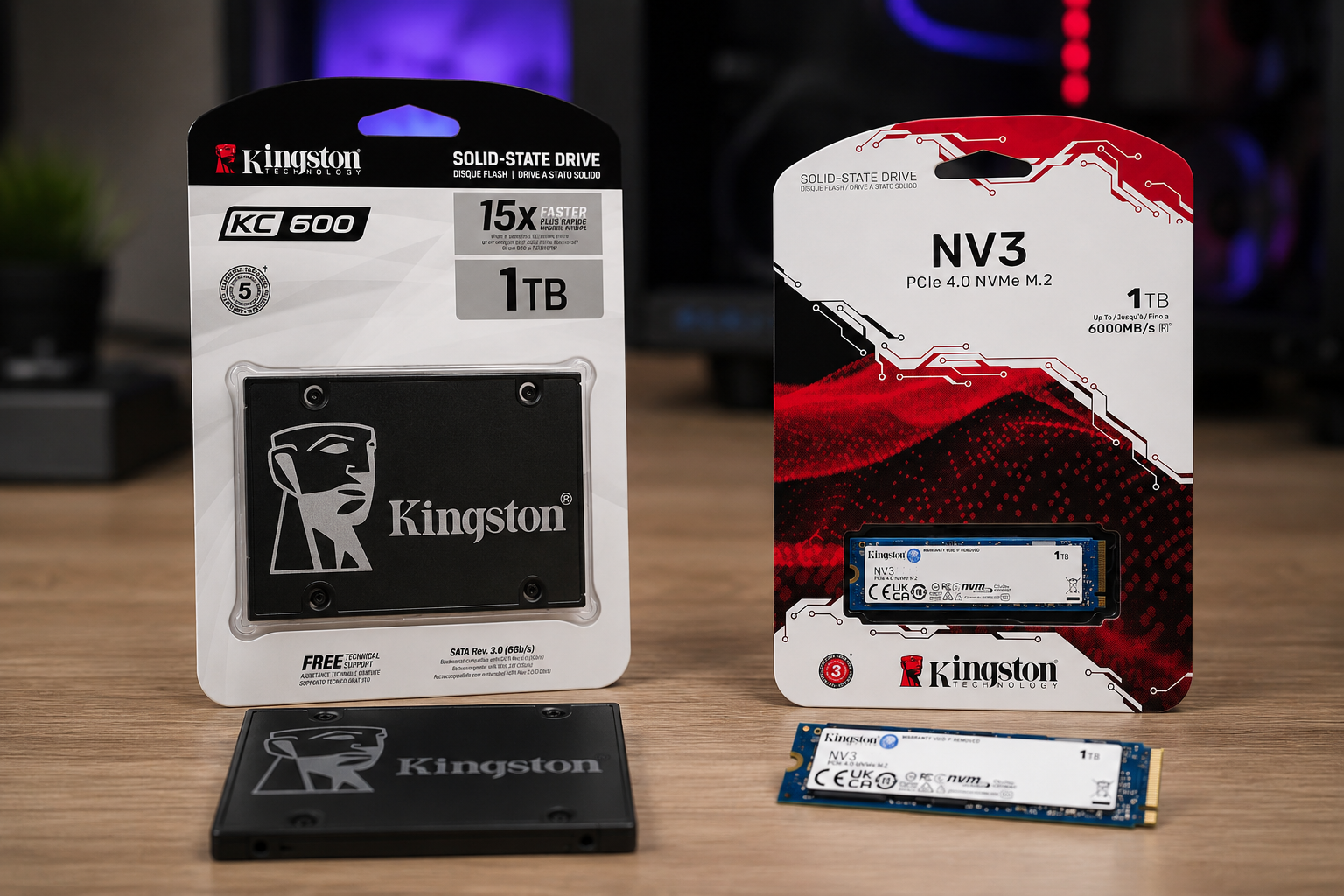
A SATA SSD is one of the most common types of solid-state drives available today.
SATA stands for Serial ATA, a storage interface originally developed for traditional hard drives. As SSD technology evolved, manufacturers began using the same interface for solid-state drives.
One of the biggest advantages of SATA SSDs is compatibility. Most older computers and laptops support SATA connections, making them an excellent upgrade option for users replacing an HDD.
SATA SSDs remain popular among:
Home users
Office workers
Students
Owners of older laptops
Budget-conscious buyers
For many users, a SATA SSD offers an excellent balance between price and performance.
How Fast Is a SATA SSD?
Compared to traditional hard drives, SATA SSDs provide a massive improvement in speed.
A typical HDD usually delivers transfer speeds between 100 MB/s and 150 MB/s.
Most SATA SSDs, on the other hand, can achieve speeds of approximately 500 MB/s or more.
This difference becomes immediately noticeable during daily use.
Benefits include:
Faster Windows startup times
Quicker application launches
Improved file transfer performance
Better overall system responsiveness
Upgrading from an HDD to a SATA SSD is widely considered one of the most effective ways to improve computer performance.
What Is an NVMe SSD?
NVMe SSD technology was developed specifically to unlock the full potential of modern flash storage.
NVMe stands for Non-Volatile Memory Express.
Unlike SATA SSDs, NVMe SSDs do not use the traditional SATA interface. Instead, they connect directly to the system through PCI Express (PCIe) lanes.
This direct connection significantly reduces communication bottlenecks and allows much faster data transfer rates.
As a result, NVMe SSDs have become the preferred storage solution for gaming PCs, high-performance laptops, and professional workstations.
Why Is an NVMe SSD Faster?
The primary advantage of NVMe SSDs lies in the technology they use to communicate with the processor.
The SATA interface was originally designed many years ago and has certain performance limitations.
NVMe technology was created specifically for modern flash storage and offers several advantages:
More data channels
Direct communication through PCIe
Lower latency
Better multitasking performance
Faster data processing
Because of these improvements, NVMe SSDs can handle large files and demanding workloads much more efficiently than SATA SSDs.
Does M.2 Always Mean NVMe?
This is one of the most common misconceptions among computer users.
Many people assume that every M.2 SSD is an NVMe SSD.
However, M.2 is simply a physical form factor.
An M.2 drive can use either:
SATA technology
NVMe technology
For this reason, it is important to check the specifications before purchasing an SSD.
Seeing "M.2" on a product listing does not automatically mean that the drive supports NVMe speeds.
Who Should Choose an NVMe SSD?
NVMe SSDs are designed for users who require maximum performance.
They are especially beneficial for:
Gamers
Video editors
Graphic designers
Architects
3D artists
Software developers
Professional content creators
Businesses handling large datasets
For these users, the speed advantages of NVMe technology can save time and significantly improve productivity.
The Growing Popularity of NVMe SSDs
Over the past few years, NVMe SSDs have become increasingly affordable.
As prices continue to decrease, more users are choosing NVMe drives instead of SATA SSDs when building new systems.
Modern motherboards and laptops are now designed with NVMe support in mind, making this technology more accessible than ever before.
Because of its superior speed, lower latency, and future-proof design, NVMe SSD technology is rapidly becoming the standard for new computers.
Why Understanding the Difference Matters
Choosing between an NVMe SSD and a SATA SSD is not simply about selecting a storage device.
It is about understanding how storage performance affects:
System responsiveness
Gaming experience
Productivity
File transfer speed
Software performance
Long-term value
The right SSD can dramatically improve your overall computing experience and help you get the most out of your hardware.
Is There a Difference Between NVMe SSD and SATA SSD in Gaming?
One of the most common questions gamers ask is whether an NVMe SSD can increase gaming performance.
Many users believe that installing an NVMe SSD will significantly boost FPS. In reality, the situation is slightly different.
The components that primarily affect FPS are:
Processor (CPU)
Graphics card (GPU)
RAM
An SSD mainly influences loading times and data access speeds.
With an NVMe SSD, you can expect:
Faster game launches
Shorter loading screens
Quicker map loading
Faster game installations and updates
Improved overall responsiveness
However, in most games, the FPS difference between a SATA SSD and an NVMe SSD is minimal.
That said, modern AAA games are becoming increasingly dependent on fast storage. Open-world titles and next-generation game engines benefit significantly from the high-speed data transfer capabilities of NVMe SSDs.
How Much Faster Is Windows Startup?
One of the first things users notice after upgrading their storage is boot speed.
With a traditional HDD, Windows startup can take anywhere from 30 to 60 seconds or even longer.
A SATA SSD dramatically reduces boot times.
An NVMe SSD can reduce them even further.
In everyday use, this means:
Faster system startup
Quicker software launches
Better multitasking performance
More responsive user experience
Although the difference between SATA SSD and NVMe SSD startup times is noticeable, it is not always as dramatic as benchmark numbers may suggest.
Which SSD Is Better for Video Editing and Content Creation?
Professional users often benefit the most from NVMe technology.
Tasks such as:
4K video editing
8K video workflows
RAW photo processing
Motion graphics
3D rendering
CAD projects
require large amounts of data to be transferred continuously.
With an NVMe SSD, users can experience:
Faster project loading
Quicker file imports
Improved rendering workflows
Better preview performance
Reduced waiting times
For content creators, every minute saved can directly improve productivity.
This is one of the main reasons why professional workstations almost always use NVMe SSD storage.
Do Software Developers Need an NVMe SSD?
Software developers can also benefit greatly from NVMe technology.
Large development environments frequently perform storage-intensive operations.
Examples include:
Visual Studio
Android Studio
Unreal Engine
Unity
Docker containers
Virtual machines
When working with large projects, an NVMe SSD can reduce build times and improve overall workflow efficiency.
Developers who work with databases, containers, and virtual environments often notice substantial performance gains.
How Much Difference Does NVMe Make in Laptops?
Most modern laptops now include NVMe SSDs as standard.
Manufacturers prefer NVMe storage because it offers:
Better performance
Lower latency
Improved power efficiency
Compact design
Premium laptops, gaming laptops, and business ultrabooks increasingly rely on NVMe SSD technology.
As a result, users enjoy faster startup times, smoother multitasking, and better overall system responsiveness.
Is a SATA SSD Still Worth Buying?
Absolutely.
Some users assume that SATA SSDs are outdated because NVMe drives have become so popular.
In reality, SATA SSDs remain an excellent choice for many situations.
They are particularly suitable for:
Budget upgrades
Older laptops
Office computers
Home users
Everyday productivity tasks
For someone upgrading from an HDD, the difference between an HDD and a SATA SSD is often far greater than the difference between a SATA SSD and an NVMe SSD.
This is why SATA SSDs continue to be a valuable option.
Understanding PCIe Gen 3, Gen 4, and Gen 5 SSDs
When shopping for NVMe SSDs, you will often encounter terms such as:
PCIe Gen 3
PCIe Gen 4
PCIe Gen 5
Each generation offers increased bandwidth and higher transfer speeds.
As technology advances, SSD performance continues to improve.
However, to take advantage of newer generations, your motherboard and processor must also support the corresponding PCIe version.
Before purchasing an NVMe SSD, it is important to verify system compatibility.
Otherwise, you may not be able to utilize the drive's full performance potential.
Should You Focus Only on Speed When Buying an SSD?
Speed is important, but it is not the only factor that matters.
Many buyers focus exclusively on advertised read and write speeds.
However, other important considerations include:
Storage capacity
Reliability
Endurance ratings
Warranty period
Controller quality
NAND flash technology
Brand reputation
A high-quality SSD should deliver consistent performance over many years of use.
For this reason, choosing a reliable and trusted product is just as important as selecting a fast one.
NVMe SSD vs SATA SSD: Price Comparison
Price is one of the most important factors when choosing an SSD.
For many years, NVMe SSDs were significantly more expensive than SATA SSDs. However, as technology has matured and production volumes have increased, the price gap has become much smaller.
Today, both SATA SSDs and NVMe SSDs are available in a wide range of capacities and price categories.
In general:
SATA SSDs are usually more affordable
NVMe SSDs cost slightly more
PCIe Gen 4 and Gen 5 models command premium prices
Larger capacities naturally increase overall cost
Because the price difference is no longer as significant as it once was, many users now choose NVMe SSDs when building a new PC or purchasing a new laptop.
If your motherboard supports NVMe technology, investing a little more can provide a noticeable improvement in performance and future compatibility.
Which SSD Is Best for Different Types of Users?
There is no single SSD that is perfect for everyone.
The best choice depends entirely on how you use your computer.
Home Users
If your daily activities include:
Web browsing
Watching videos
Using Microsoft Office
Social media
Online learning
both SATA SSDs and NVMe SSDs will provide an excellent experience.
For many home users, a SATA SSD is still more than sufficient.
Students
Students typically need a balance between:
Affordability
Reliability
Performance
Depending on budget, either SATA SSDs or NVMe SSDs can be a suitable option.
Gamers
For gaming systems, NVMe SSDs are generally the preferred choice.
Modern games continue to grow in size, with many titles exceeding 100 GB.
An NVMe SSD offers:
Faster game loading
Improved responsiveness
Better support for future game technologies
Shorter installation times
While FPS gains may be limited, the overall gaming experience is often better.
Content Creators
Video editors, graphic designers, photographers, and 3D artists benefit significantly from NVMe SSDs.
The ability to move large files quickly and reduce project loading times makes NVMe storage an essential tool for creative professionals.
Business Users
For standard office environments, SATA SSDs remain a practical and cost-effective solution.
However, organizations working with:
Large databases
Virtual machines
Data analytics
Enterprise software
can gain measurable benefits from NVMe storage.
Common Mistakes People Make When Buying an SSD
Many buyers make avoidable mistakes when selecting storage devices.
Focusing Only on Price
The cheapest SSD is not always the best value.
A low-quality drive may deliver poor performance or reduced reliability over time.
Ignoring Compatibility
Before purchasing an SSD, users should verify:
Motherboard support
Laptop compatibility
PCIe generation support
Available storage slots
Failure to do so can lead to installation issues or limited performance.
Looking Only at Capacity
Two SSDs with the same storage capacity can deliver dramatically different performance levels.
Technology, controller quality, and NAND flash type all play important roles.
Choosing Unknown Brands
Storage devices contain important personal and professional data.
For this reason, selecting a reputable manufacturer is strongly recommended.
Ignoring Future Needs
An SSD that seems large enough today may become insufficient in a few years.
Considering future storage requirements can prevent unnecessary upgrades later.
Which SSD Brands Are Most Reliable?
Several manufacturers have established strong reputations for quality and reliability.
Popular SSD brands include:
Samsung
Kingston
Crucial
WD (Western Digital)
Lexar
ADATA
TeamGroup
These companies offer both SATA SSD and NVMe SSD products across multiple performance categories.
Choosing a trusted brand can improve long-term reliability and peace of mind.
Is the Future of Storage NVMe?
Industry trends strongly suggest that NVMe technology will continue to dominate the storage market.
The reasons are clear:
Faster performance
Lower latency
Increasing affordability
Wider motherboard support
Better compatibility with modern software
Many new laptops and desktop computers now ship exclusively with NVMe SSD storage.
As prices continue to decrease, NVMe drives are expected to become the standard choice for most users.
Final Verdict: NVMe SSD or SATA SSD?
The decision between an NVMe SSD and a SATA SSD ultimately depends on your needs and budget.
If your goal is:
Maximum performance
Faster file transfers
Gaming optimization
Professional content creation
Future-proof hardware
then an NVMe SSD is the better choice.
If your goal is:
Upgrading an older computer
Reducing costs
Everyday productivity
General home use
then a SATA SSD remains an excellent option.
Both technologies offer enormous advantages compared to traditional HDDs.
However, when it comes to raw speed, responsiveness, and future readiness, NVMe SSDs represent the next generation of storage technology.
Frequently Asked Questions
How much faster is an NVMe SSD compared to a SATA SSD?
Depending on the model and PCIe generation, an NVMe SSD can be anywhere from five to twenty times faster than a SATA SSD.
Does an NVMe SSD increase FPS in games?
Not directly. However, it can significantly improve loading times and overall gaming responsiveness.
Is every M.2 SSD an NVMe SSD?
No. M.2 is only a form factor. An M.2 drive can use either SATA or NVMe technology.
Is a SATA SSD still worth buying?
Yes. SATA SSDs remain excellent options for everyday computing, office work, and budget upgrades.
Will an NVMe SSD work on every motherboard?
No. Your motherboard must support NVMe storage and PCIe connectivity.
Which SSD is best for gaming?
For modern gaming systems, NVMe SSDs are generally the recommended choice.
Does an SSD make a computer faster?
Yes. SSDs dramatically improve system startup times, software loading speeds, and overall responsiveness.
Which SSD is the best choice today?
For new systems, NVMe SSDs are generally the most future-proof and performance-oriented option, especially since the price difference has become relatively small.